onboarding-zoom
Cinematic onboarding tours for live websites.
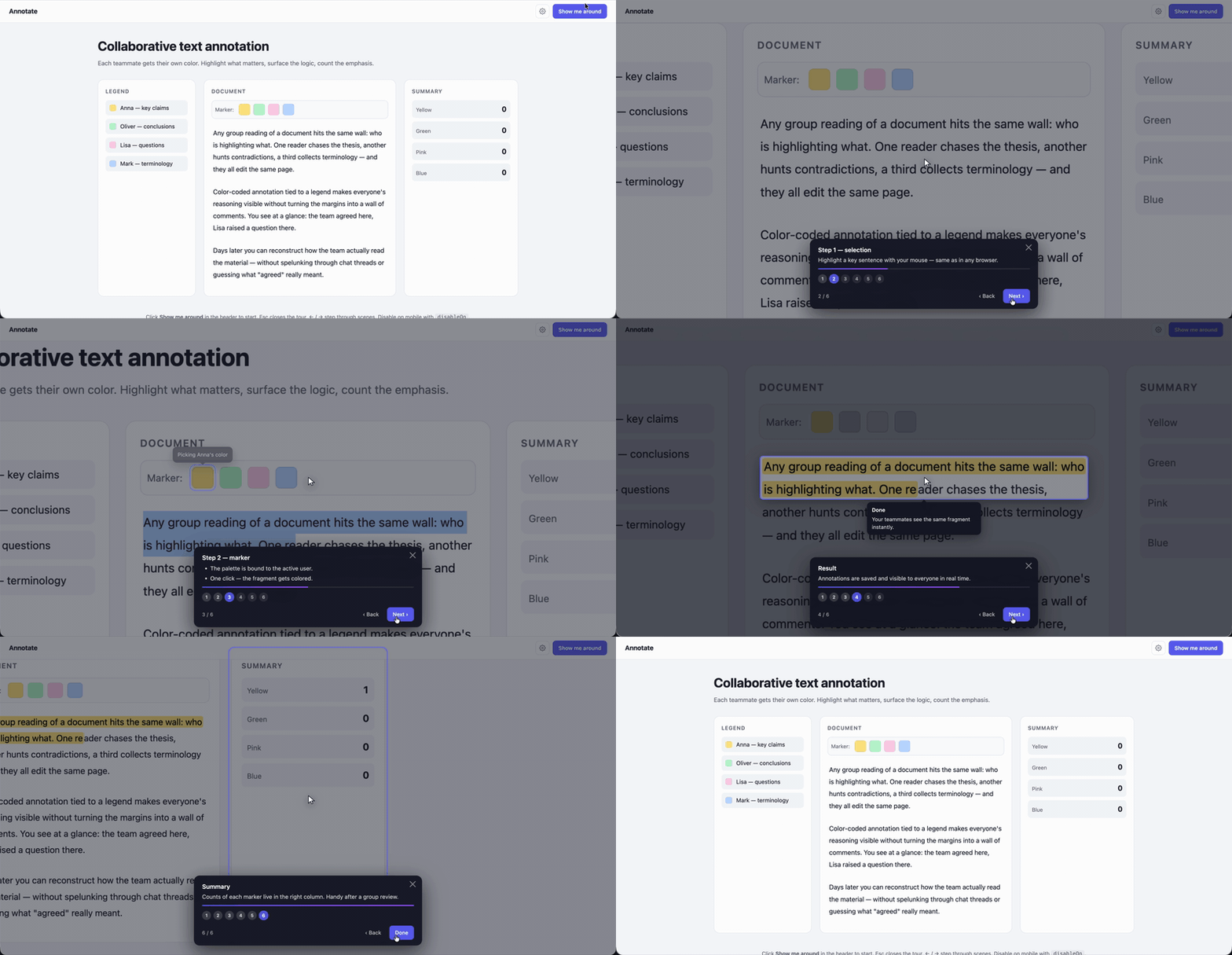
The camera flies around the page, zooms into the feature you want to highlight, animates a fake cursor, makes the click, shows the result, then pans to the next hotspot. Replaces the dilemma of “describe the new feature in a tooltip vs. record a separate screencast” with a guided, cinematic experience that lives on your real UI.
- No dependencies. Single ~30kb file (uncompressed), drop in via
<script>. - Works on any HTML page. No framework lock-in.
- 16 locales out of the box, plus runtime locale sync (
<html lang>, custom DOM event, or imperative API). - Theming via CSS variables (
dark/lightpresets or your own). - Built-in device gating (skip on mobile, narrow screens, touch, custom rules).
- Forward / back navigation with accelerated camera transitions.
- Optional state revert (snapshot innerHTML, restore on tour end).
- Optional
runOncemode that auto-starts on first visit and remembers inlocalStorage.
Quick start
<script src="onboarding-zoom.js"></script>
<script src="locales/en.js"></script>
<script>
  const tour = OnboardingZoom.create({
    locale: 'en',
    excludeFromCamera: ['.site-header'],
    scenes: [
      {
        target: '#editor',
        zoom: 1.5,
        title: 'Text annotation',
        caption: 'Highlight any fragment with one click.',
        actions: [
          { type: 'highlight', selector: '#editor p:first-child', holdMs: 600 },
          { type: 'selectText', selector: '#editor p:first-child', start: 0, end: 30 },
          { type: 'click', selector: '.marker[data-color="yellow"]', afterMs: 400 }
        ]
      },
      {
        target: '.legend',
        keepZoom: true,
        title: 'Legend',
        caption: 'Each user has their own color.',
        actions: [
          { type: 'pulse', selector: '.legend-item:first-child', duration: 800 }
        ]
      }
    ]
  });

  document.querySelector('#start-tour').addEventListener('click', () => tour.start());
</script>
Installation
Copy onboarding-zoom.js into your static assets, plus any locale files you need from locales/.
<script src="/assets/onboarding-zoom.js"></script>
<script src="/assets/locales/en.js"></script>
<script src="/assets/locales/de.js"></script>
Or pull all 16 locales at once (~1.5kb gzip):
<script src="/assets/onboarding-zoom.js"></script>
<script src="/assets/locales/all.js"></script>
Locale files registered after the library script are picked up automatically. If a locale file loads before the main library, it queues itself on window.__OZ_LOCALES_PENDING__ and the library drains the queue on init.
Configuration
const tour = OnboardingZoom.create({
  // Camera root. 'body' wraps body children into a stage div automatically.
  // Pass a selector or Element to scope the camera to a specific region.
  cameraRoot: 'body',

  // Selectors to keep OUT of the camera (header, modals, chat widgets).
  // position: fixed and position: sticky elements are auto-excluded.
  excludeFromCamera: ['.site-header'],

  // Camera transition speed (ms) for cinematic playback.
  transitionMs: 700,

  // User-initiated next/prev/goto uses this multiplier for snappier feel.
  fastFactor: 0.45,

  // Default zoom for scenes that don't specify one explicitly.
  initialZoom: 1.4,

  // Pan-style intro animation between scenes ('direct' | 'zoomOut').
  interscene: 'direct',

  // HUD chrome — on by default.
  showControls: true,
  showCursor: true,
  showDim: true,

  // Keyboard shortcuts.
  closeOnEsc: true,
  keyboardNav: true,        // ArrowLeft / ArrowRight

  // Theme: preset name or custom object of CSS variables.
  theme: 'dark',            // 'dark' | 'light' | { bg, fg, accent, ... }

  // Locale: registered code or full/partial object.
  locale: 'en',

  // Auto-sync locale with the host site.
  watchHtmlLang: false,           // observe <html lang="..."> changes
  localeEventName: null,          // listen for a custom DOM event

  // One-shot auto-start that remembers in localStorage.
  runOnce: false,
  storageKey: 'oz_tour_dismissed',
  autoStart: false,
  autoStartDelay: 0,              // ms to wait between DOMReady and auto-firing start()
  startDelay: 0,                  // ms to wait inside start() before the tour actually begins
                                  //   — applies to manual tour.start() AND auto-start
                                  //   — overridable per call: tour.start({ delay: 1500 })
                                  //   — cancellable via tour.cancelStart() or tour.skip()

  // Restore DOM after the tour ends (undo clicks/typing/highlights).
  revertOnEnd: false,
  snapshotTargets: null,          // optional list of selectors to snapshot

  // Device gating — disable the tour on certain device profiles.
  disableOn: {
    disableBelow: null,           // disable if window.innerWidth < this
    disableAbove: null,           // disable if window.innerWidth > this
    heightBelow: null,
    touch: false,                 // disable on touch-capable devices
    coarsePointer: false,         // disable on @media (pointer: coarse)
    mobile: false,                // disable based on user-agent
    userAgent: null,              // RegExp source string
    custom: null                  // function() => boolean
  },

  // Hooks (also available via tour.on)
  onStart:       null,
  onEnd:         null,
  onSkip:        null,
  onSceneEnter:  null,
  onSceneExit:   null,

  // The actual scenes.
  scenes: [ /* ... */ ]
});
Scene shape
{
  // Required: element to focus the camera on.
  target: '#editor p:first-child',

  // Optional: zoom level. Omit + set keepZoom to pan without scale change.
  zoom: 1.8,

  // Just pan to target, keep current camera scale (great for sequential pans).
  keepZoom: false,

  // HUD content.
  title: 'Step 1',
  caption: 'Single line, multiple paragraphs (array), or { html: "<b>rich</b>" }',

  // Optional camera tuning per scene.
  transitionMs: 700,
  easing: 'easeInOutCubic',

  // Auto-advance instead of waiting for user click.
  autoAdvance: false,
  autoAdvanceDelay: 800,

  // Action sequence — runs after the camera arrives.
  actions: [ /* ... */ ]
}
Actions
The action runner executes a list per scene. Built-in actions:
| Type | Purpose |
|---|---|
wait |
Sleep ms milliseconds |
waitFor |
Wait until selector appears (uses MutationObserver) |
moveCursor |
Animate the fake cursor to a selector or coords |
click |
Move cursor + visual ripple + dispatch real click |
type |
Simulate typing into an input (fires real input events) |
selectText |
Programmatic text selection inside an element |
highlight |
Spotlight box that follows its target across camera moves |
pulse |
Pulsing ring overlay on an element |
comment |
Tooltip bubble pinned to an element with arrow |
clearComments |
Remove all comment bubbles |
pan |
Pan camera to a different element mid-scene |
setZoom |
Change zoom on the current scene’s target |
say |
Update HUD title/caption mid-scene |
custom |
Escape hatch — { type: 'custom', fn: ctx => {...} } |
You can register custom actions globally:
OnboardingZoom.registerAction('flashScreen', async (action, ctx) => {
  document.body.style.background = action.color || 'red';
  await new Promise(r => setTimeout(r, 300));
  document.body.style.background = '';
});
Click without side-effects
If you want the user to be able to step forward and back without re-firing real handlers, set dispatch: false. The cursor still animates and the ripple still fires — only the synthetic click() call is skipped.
{ type: 'click', selector: '.publish-btn', dispatch: false, afterMs: 300 }
API
OnboardingZoom.create(options) -> Tour
Creates a tour. Doesn’t start it — call tour.start().
Tour instance
tour.start();              // Promise<boolean> — false if blocked by device gating / runOnce flag
tour.next();               // advance to next scene (fast camera)
tour.prev();               // back to previous (fast camera)
tour.goto(sceneIndex);     // jump to a specific scene
tour.skip();               // close the tour, fire onSkip, persist runOnce flag
tour.setLocale(codeOrObj); // switch HUD language live
tour.canRun();             // { ok: boolean, reason?: string }
tour.active;               // boolean
tour.idx;                  // current scene index (-1 before start)

tour.on('start',       fn);
tour.on('sceneEnter',  (scene, index) => {});
tour.on('sceneExit',   (scene, index) => {});
tour.on('end',         ({ skipped }) => {});
tour.on('skip',        fn);
Module helpers
OnboardingZoom.canRun(options);        // check device gating without creating a Tour
OnboardingZoom.hasSeen(storageKey);    // boolean — has runOnce been satisfied?
OnboardingZoom.resetSeen(storageKey);  // clear the flag
OnboardingZoom.themes;                 // { dark, light } presets
OnboardingZoom.locales;                // mutable registry of registered locales
OnboardingZoom.registerAction(name, fn);
OnboardingZoom.version;
OnboardingZoom.jsonVersion;            // current tour-JSON schema version

// JSON authoring & validation
OnboardingZoom.validate(jsonOrString); // { ok, errors[], warnings[] } — no side effects
OnboardingZoom.fromJSON(jsonOrString, extraOpts?);  // Tour — throws on invalid data
OnboardingZoom.fromUrl(url, extraOpts?);            // Promise<Tour> — fetches & validates
tour.toJSON();                                       // serialize a tour to a plain object

// Chain multiple tours
OnboardingZoom.chain({ tours: [...], rememberProgress: true, storageKey: 'oz_chain_v1' });
JSON tours
Author once, save anywhere, validate before shipping. Useful for letting non-developers maintain content while devs control the runtime.
// Export an existing tour to JSON (e.g. from your dev environment)
const json = tour.toJSON();
// { version: 1, scenes: [...], theme: 'dark', locale: 'en', ... }

// Validate a tour spec authored by your PM
const { ok, errors, warnings } = OnboardingZoom.validate(json);
if (!ok) console.error(errors);

// Load from a static file in your repo
OnboardingZoom.fromUrl('/tours/welcome.json').then(tour => tour.start());

// Or from a CMS / S3 / your backend
OnboardingZoom.fromUrl('https://cdn.example.com/tours/v2/welcome.json')
  .then(tour => tour.start());

// Inject non-serializable bits (callbacks, custom action fns) at load time:
OnboardingZoom.fromUrl('/tours/welcome.json', {
  onEnd: ({ skipped }) => analytics.track('tour_end', { skipped })
}).then(tour => tour.start());
What survives toJSON(): scene structure, all built-in actions, theme presets, locale codes, timing options, device gating rules. What gets stripped: callbacks (onStart, onEnd, etc.), { type: 'custom', fn: ... } actions, Element references. Pass them via extraOpts at load time instead.
Chains
Run several tours in sequence — useful for multi-page onboarding, role-specific flows, or staged feature introductions.
const chain = OnboardingZoom.chain({
  tours: [
    '/tours/welcome.json',                   // lazy-loaded URL
    { url: '/tours/editor.json' },           // same — explicit form
    { scenes: [...], theme: 'light' },       // inline spec
    OnboardingZoom.create({ scenes: [...] }) // pre-built Tour instance
  ],
  rememberProgress: true,                    // persist current index in localStorage
  storageKey: 'app_onboarding_chain_v1',     // versioned key — bump to re-show
  continueOnSkip: false,                     // skipping a tour stops the chain (default)
  onTourSwitch: (tour, idx) => analytics.track('tour_step', { idx }),
  onEnd: ({ skipped, idx }) => {}
});

chain.start();    // resumes from saved index if rememberProgress
chain.skip();     // abort the rest
chain.reset();    // forget progress — next start() begins from 0
chain.current();  // the active Tour instance, or null
Each tours[] entry can be a Tour instance, an inline { scenes } spec, a URL string, { url }, a Promise, or a function returning any of the above. Resolution is lazy — the next tour isn’t fetched until the current one ends, so a 5-step chain has no upfront network cost.
Internationalization
The library ships with English defaults. Other languages live in locales/*.js and self-register into OnboardingZoom.locales on load.
<script src="onboarding-zoom.js"></script>
<script src="locales/ru.js"></script>
<script src="locales/de.js"></script>
<script src="locales/fr.js"></script>
OnboardingZoom.create({ locale: 'ru', /* ... */ });
Bundled locales
en, ru, uk, es, de, fr, it, pt, pl, cs, tr, nl, zh, ja, ko, ar. All 16 in one shot via locales/all.js.
Locale shape
{
  next: 'Next',         // primary action button
  prev: 'Back',         // secondary action button
  finish: 'Done',       // primary button on the last scene
  skip: 'Close',        // close icon aria-label
  step: 'Step',         // dot fallback label when a scene has no title
  onboarding: 'Onboarding'  // HUD dialog aria-label
}
Partial objects are fine — missing keys fall through to English.
Sync locale with the host site
Three options, pick whichever fits your i18n setup:
1. Watch <html lang> — zero coupling, observer-based.
OnboardingZoom.create({ locale: 'en', watchHtmlLang: true, /* ... */ });
// Anywhere in your i18n logic:
document.documentElement.lang = 'fr';
// HUD redraws in French immediately. Also catches first paint.
// Falls back from 'pt-BR' to 'pt' if base language is registered.
2. Custom DOM event — when your i18n state isn’t reflected in <html lang>.
OnboardingZoom.create({ localeEventName: 'app:locale', /* ... */ });
// In your store/router:
document.dispatchEvent(new CustomEvent('app:locale', { detail: 'ja' }));
// Or with a partial override object:
document.dispatchEvent(new CustomEvent('app:locale', {
  detail: { next: 'GO!', finish: 'Done!' }
}));
3. Imperative — most direct.
const tour = OnboardingZoom.create({ /* ... */ });
i18n.on('change', code => tour.setLocale(code));
All three update the HUD live: buttons, dots, ARIA labels, and fallback step labels redraw on the spot.
Note: locale only affects HUD chrome. Scene titles and captions are your content. For multi-language scenes, either re-create the tour when the language changes, or run your titles/captions through your own translation function.
Adding a new locale
// locales/sv.js
(function (global) {
  var locale = {
    next: 'Nästa',
    prev: 'Tillbaka',
    finish: 'Klar',
    skip: 'Stäng',
    step: 'Steg',
    onboarding: 'Genomgång'
  };
  if (global.OnboardingZoom && global.OnboardingZoom.locales) {
    global.OnboardingZoom.locales.sv = locale;
  } else {
    (global.__OZ_LOCALES_PENDING__ = global.__OZ_LOCALES_PENDING__ || []).push(['sv', locale]);
  }
}(typeof window !== 'undefined' ? window : this));
Theming
All colors live in CSS variables prefixed --oz-*. Pass a preset name or an object of overrides:
OnboardingZoom.create({ theme: 'light', /* ... */ });
OnboardingZoom.create({ theme: 'dark',  /* ... */ });

OnboardingZoom.create({
  theme: {
    bg: 'rgba(28, 18, 48, 0.96)',
    fg: '#fff5e6',
    accent: '#ff6b6b',
    accentStrong: '#e05151',
    accent2: '#ffb85c',
    spotlight: '#ff6b6b',
    pulse: 'rgba(255, 107, 107, 0.7)',
    radius: '18px'
  }
});
Available theme keys
bg, fg, fgMuted, accent, accentStrong, accent2, spotlight, dim, spotlightOverlay, track, trackHover, cursorRing, pulse, cursorFill, cursorStroke, shadow, shadowSoft, radius, radiusSm.
Anything you don’t override falls back to the dark preset defaults defined in :root. The library applies your theme via inline custom properties on <html> when the tour starts and removes them on teardown — pre-existing --oz-* values are restored exactly.
You can also style around it without options — just write your own CSS rule against :root (or any ancestor of the HUD) and the cascade picks it up.
Device gating
Skip the tour on devices where it doesn’t make sense:
disableOn: {
  disableBelow: 760,        // narrow screens
  disableAbove: 2400,       // ultra-wide (rare)
  touch: true,              // any touch-capable device
  coarsePointer: true,      // pointer: coarse media query
  mobile: true,             // user-agent string contains Mobi/Android/iPhone/iPad
  userAgent: '/Headless/i', // custom regex
  custom: () => navigator.connection && navigator.connection.saveData
}
tour.start() returns false if a gate matches and logs the reason. Combine with runOnce: true to also avoid showing on devices where the tour is gated and not retry on later visits.
State revert
If your tour clicks real buttons or fills inputs, you can roll the DOM back to its pre-tour state on close:
OnboardingZoom.create({
  revertOnEnd: true,                            // default: snapshots the camera root
  snapshotTargets: ['#editor', '#stats-panel'], // or restrict to specific zones
  scenes: [/* ... */]
});
The library captures innerHTML of the targets at tour start and writes it back on teardown.
Caveats:
- This is
innerHTMLreplacement. It works great for vanilla DOM and simpler SPAs where components own their own DOM. Deeply reactive frameworks (React/Vue at scale) can desync — if your virtual DOM tree thinks a node still exists but you’ve replaced it under their feet, behavior gets weird. For SPAs, prefer the imperative pattern: useonStart/onEndto flip a “demo mode” flag in your state and let your framework handle the swap. - Network calls fired during the tour aren’t undone. If a real
clickposted to your API, that’s done. - Focus, scroll position inside elements, and text selection are not restored (selection is explicitly cleared to avoid pointing into orphaned nodes).
For tours that step backwards and forwards without side-effects, use dispatch: false on click actions and visually mimic the result instead.
One-time auto-start
OnboardingZoom.create({
  runOnce: true,
  storageKey: 'esgo_intro_v1',  // version your key — bump it to re-show the tour
  autoStartDelay: 800,
  scenes: [/* ... */]
});
Behavior: on DOMContentLoaded, library checks localStorage[storageKey]. If unset, it auto-starts after autoStartDelay ms. On tour end (skip or finish), it sets the flag. Manual tour.start() always works — the flag only gates auto-start.
A “show me the tour again” button:
document.querySelector('#replay-tour').addEventListener('click', () => {
  OnboardingZoom.resetSeen('esgo_intro_v1');
  tour.start();
});
How the camera works (under the hood)
The camera transforms a “stage” element via transform: translate(tx, ty) scale(s) with transform-origin: 0 0. When cameraRoot is body, the library wraps body’s static children into a generated <div class="oz-stage"> (auto-excluding position: fixed / position: sticky elements so they keep their viewport-relative behavior). When the tour ends, the wrapper is unwrapped and the DOM is back to where it was.
Centering math (with transform-origin: 0 0):
tx = innerWidth  / 2 − (target.layoutX + target.layoutW / 2) × scale
ty = innerHeight / 2 − (target.layoutY + target.layoutH / 2) × scale
Layout coords are recovered from getBoundingClientRect() by inverting the current transform.
Spotlight and Comment overlays are positioned in viewport pixels but track their target element via requestAnimationFrame so they stay anchored across camera transitions.
Browser support
- Modern Chrome, Firefox, Safari, Edge.
- Uses
MutationObserver,requestAnimationFrame,AbortController,getBoundingClientRect, CSStransform, CSS custom properties. - No IE11 support.
Files
onboarding-zoom.js     ~28kb — main library (no deps)
locales/en.js          ~0.4kb each
locales/ru.js
locales/uk.js
locales/es.js
locales/de.js
locales/fr.js
locales/it.js
locales/pt.js
locales/pl.js
locales/cs.js
locales/tr.js
locales/nl.js
locales/zh.js
locales/ja.js
locales/ko.js
locales/ar.js
locales/all.js         ~3kb — all 16 in one file
demo.html              working example with text-annotation feature
License
MIT.